A practical guide for knowledge workers who want better results without burning through their usage allowance.
Most people using AI at work treat it like a single tool. You open an app, type a question, get an answer. The idea that you might choose which AI to use for a given task, and that the choice matters, has not made it into most people's day-to-day practice.
It should. Because the model you use changes the quality of the output, the speed of the response, and how quickly you burn through your subscription allowance. Getting this wrong consistently means either spending more than you need to, or getting worse results than you could.
This is not a technical article. You do not need to understand how large language models work to apply what follows. You need to understand your work.
The model landscape, briefly
Every major AI provider, Anthropic, OpenAI, Google, Microsoft, structures their offering as a tiered family of models. The names differ, but the logic is consistent across all of them.
At one end, there are lighter, faster models. They are less expensive to run, respond quickly, and handle well-defined tasks accurately. At the other end, there are more capable, more expensive models built for complex reasoning, nuanced judgment, and tasks that require holding a lot of context at once.
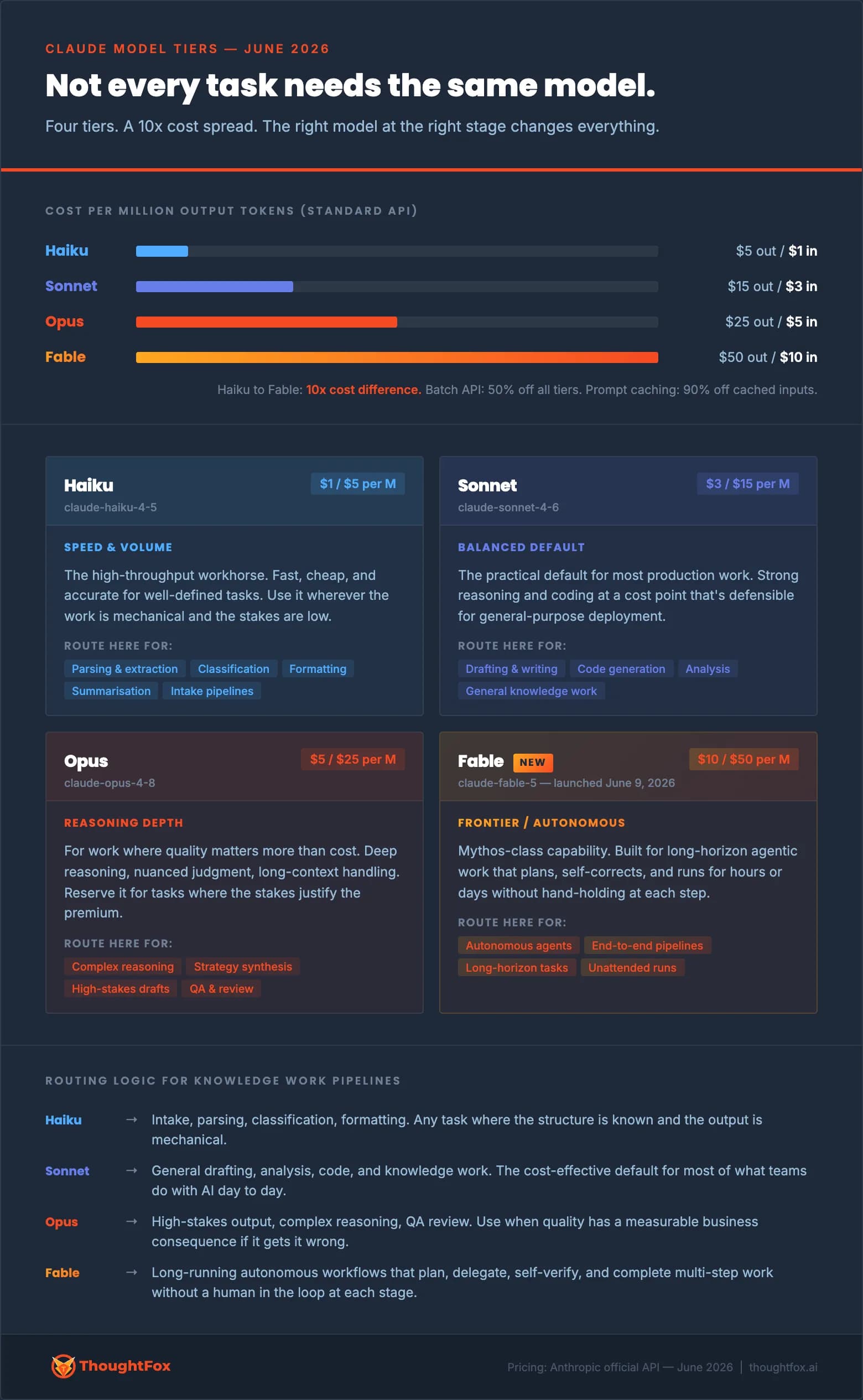
Using Anthropic's Claude as a concrete example, the current tier structure looks like this:
Haiku is the lightest tier. Fast, cheap, reliable for mechanical tasks where the structure is clear and the stakes are low.
Sonnet is the middle tier and the practical default for most knowledge work. Strong enough for drafting, analysis, and research at a cost that scales sensibly.
Opus is the premium reasoning tier. Deeper judgment, more nuanced output. Worth using when the quality of the result has a real business consequence.
Fable is the frontier tier, launched in June 2026. Built for long-horizon autonomous work: tasks that span multiple documents, require multi-step reasoning, and would traditionally need a skilled person to hold the entire problem in their head at once.
The same tiering structure exists in GPT, Gemini, and every other major AI family. The model names are different. The logic is identical.
What this means if you pay a subscription
If you use Claude, ChatGPT, Gemini, or Copilot through a subscription plan, you never see a per-token bill. You pay a flat monthly fee.
What you do experience is a usage allowance. Heavier, more capable models consume that allowance significantly faster than lighter ones. If you use your most powerful model for every task, drafting a two-line email, reformatting a table, summarising a meeting, you will burn through your allowance on work that a lighter model would have handled just as well.
The 10x compute cost difference between the lightest and most capable Claude models is a reasonable proxy for how much faster your allowance disappears when you reach for the top tier by default.
If you are building automated workflows through an API, the cost difference is direct and measurable. If you are a subscription user, the cost difference expresses itself as allowance exhaustion. Either way, the principle is the same: match the model to what the work actually requires.
The question most people do not ask
Before choosing which model to use, there is a more fundamental question: what does this task actually require?
Most knowledge work sits somewhere on two dimensions. The first is complexity: how much reasoning, synthesis, or judgment does the task involve? The second is stakes: what happens if the output is wrong or mediocre?
A first-draft email to a colleague is low complexity, low stakes. A regulatory submission that will be reviewed by a body with enforcement powers is high complexity, high stakes. These are not the same task, and they should not get the same tool.
The mistake most teams make is not consciously making the wrong choice. It is not making a choice at all. They use whatever model the interface defaults to, for everything, regardless of what the work actually needs.
A practical routing guide for knowledge work
Here is how to think about model selection for the most common knowledge work tasks.
Reach for the lightest model when the work is mechanical. Inbox triage. Reformatting data. Extracting fields from a document. Generating a first list of options you will then review yourself. Summarising a meeting transcript into bullet points. These tasks have clear structure, well-defined outputs, and low consequences if the model misses something minor. Lighter models handle them accurately and quickly.
Use the balanced default for most everyday knowledge work. Drafting communications, writing internal briefing notes, summarising research, creating presentation outlines, synthesising a few sources into a coherent narrative. This covers the majority of what most knowledge workers use AI for day to day. The balanced tier is built precisely for this range of tasks.
Move to the premium reasoning tier when stakes are genuinely high. Board papers. Regulatory submissions. Contract risk analysis. Strategic documents that will be reviewed by people who will push back on the reasoning. Synthesis of genuinely conflicting information where the right answer is not obvious. When a poor output has a real business consequence, the extra capability is worth the extra cost.
Use the frontier tier for work that would otherwise take a skilled person days. End-to-end due diligence across multiple documents. A research task that requires pulling together and reconciling many sources. A complex analysis where the brief is ambiguous and the model needs to structure the problem before it can solve it. This tier is not the right default for any task. It is the right choice for tasks where its autonomous, long-horizon capability delivers something the other tiers genuinely cannot.
The common mistakes
Using the most powerful model for everything. This is the most frequent error. It feels safer. In practice, it exhausts your allowance on work that did not require it, and trains a habit of over-reliance on capability you do not actually need for the majority of tasks.
Using the lightest model for work that requires judgment. The opposite mistake. Routing a complex legal analysis or a high-stakes communication through a fast, cheap model because you want a quick answer. The output will be faster and worse, often in ways that are not immediately obvious.
Not reviewing the output relative to the stakes. Any model at any tier can produce plausible-looking output that is wrong. The appropriate level of human review should scale with the consequence of being wrong, not with your confidence in the model. A Haiku-generated summary of a meeting has low review requirements. A Fable-generated analysis that will inform a board decision requires the same scrutiny you would apply to the work of a capable but fallible colleague.
A note on automated workflows
Everything above applies to individual, manual use of AI tools. If your organisation is building automated workflows, the same logic applies but the decisions are made at design time rather than task time.
A well-designed workflow routes each stage to the appropriate model automatically. Intake and parsing stages run on lightweight models. Drafting and reasoning stages run on capable ones. Review and quality-check stages run on models strong enough to critique the output of the stage before them.
This is sometimes called model routing. It is the difference between an AI workflow that is well-engineered and one that is just expensive.
The organisations that build this deliberately will have meaningfully lower operating costs and better output quality than those who default everything to the most capable model available.
The underlying principle
The question is not which AI model is best. There is no universally best model, any more than there is a universally best tool in any other domain.
The question is what the work requires, and whether the tool you are reaching for is matched to that requirement.
Capability and cost scale together across every AI provider's model family. That is not a coincidence. It reflects genuine differences in what each tier can do. Treating all tiers as interchangeable is a waste of money at the top end and a risk to quality at the bottom.
Map your work to the gradient. Use the lightest model that gets the job done well. Upgrade deliberately when the work genuinely demands it.
That is the whole practice. It takes about five minutes to internalise, and it will change how you use AI from the first day you apply it.